
← Financial Modeling in Excel from Scratch
Lesson
Best practices: no hardcoding, references to inputs, consistency, color coding
Apply the basic rules of model hygiene: put every number in an assumption cell and reference it in formulas instead of hardcoding constants.
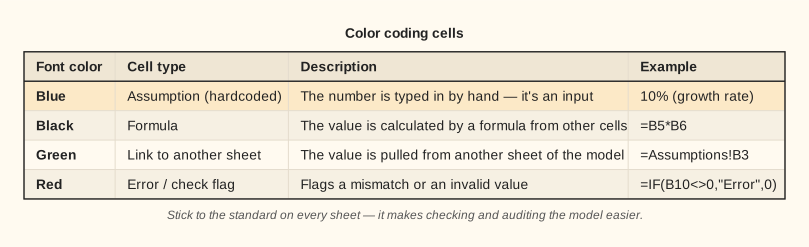
Color coding cells in a model
The color standard: blue for inputs, black for formulas, green for links
A single color standard lets anyone using the model see instantly where the assumptions are and where the automatic calculations are.
Lesson notes
How to build a model you can trust
The first and most important rule: don't hardcode numbers in formulas. Compare two approaches: =B2*1.05 — here the 1.05 growth factor (5% growth) is hidden inside the formula, where you can't see it and it's hard to change. The right way: =B2*Assumptions!C3 — the factor sits in its own cell on the assumptions sheet, and if you need to change the growth rate, you change one cell and the whole model recalculates automatically.
The second rule: put all inputs in a separate block or an “Assumptions” sheet. Calculation sheets should only reference it. That way, anyone who opens your model immediately finds all the assumptions in one place and can check or change them.
The third rule: consistent formulas across a row. If cell C5 contains =C3*Assumptions!B2, then D5 should contain =D3*Assumptions!B2 — the same logic, just shifted to the next period. Filling a formula to the right should be safe and predictable.
The fourth rule: color coding. Blue marks cells with numbers entered by hand (inputs), black marks cells with formulas (calculations), and green marks links to other sheets. This visual convention is standard in professional financial modeling and shows at a glance where the assumptions “live” and where the calculations are.