
Apply the idea that “money today is worth more than money tomorrow” by calculating future value FV=PV·(1+r)^n and present value PV=FV/(1+r)^n, including with the FV and PV functions.
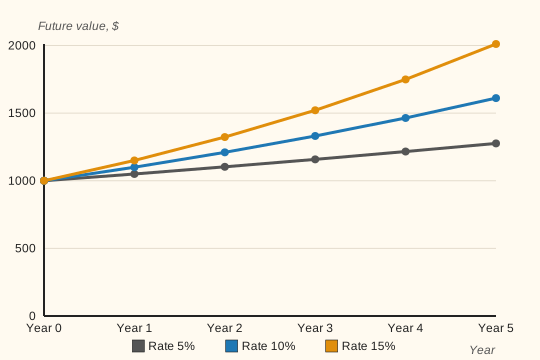
How future value grows at different rates
$1,000 grows differently at 5%, 10%, and 15% over 5 years
Compounding (earning interest on interest) sharply speeds up growth over a long horizon — especially at high rates.
Lesson notes
The time value of money: why $1,000 today ≠ $1,000 tomorrow
Money received today is worth more than the same amount in the future, because you can invest it and earn interest. This is the core principle of the Time Value of Money (TVM). The rate r reflects the opportunity cost of money: if I invest $1,000 at 10% a year, in a year I'll have $1,100. The number of periods n is how many times the rate is applied.
Future Value is calculated with the formula FV = PV · (1 + r)^n. Example: $1,000 at 10% for 2 years → FV = 1000 · (1.1)² = 1000 · 1.21 = $1,210. This is called compounding: interest is earned both on the deposit itself and on the interest already accumulated.
Present Value is the reverse operation: PV = FV / (1 + r)^n. What is the right to receive $1,210 in 2 years worth today at a 10% rate? PV = 1210 / 1.21 = $1,000. Discounting is used to compare cash flows at different points in time — everything is brought back to “today.”
In Excel, the FV function calculates future value: FV(rate, nper, pmt, pv, type). The PV function calculates present value: PV(rate, nper, pmt, fv, type). For a lump sum, set pmt to 0. Important: if you enter the deposit as a positive number, Excel returns the result with a minus sign, because it treats the money you put in as an outflow. Put a minus in front of the function, =-FV(...), or enter the deposit as a negative number: =FV(B2,B3,0,-B1).